Best POS System for Small Business in 2026 - Top Picks Reviewed and Ranked
In This Article
- Quick Answer
- Top Pick: Square
- Side-by-Side
- Full Reviews
- How to Choose
- How We Evaluated These Tools
- Who Should Be Reading This Comparison
- Which POS Systems You Can Buy Direct and Which You Cannot
- Detailed Look at the Three You Can Price Yourself
- The Key Differences That Actually Matter
- When a Payment Processor Freezes Your Money
- When to Choose Each Platform
- FAQ
- Square is the only one of the three with a free plan. It costs $0 a month. In person cards run 2.6% plus 15 cents.
- Lightspeed publishes the lowest card present rate of the three at 1.5%, but it starts at $89 a month and has no free plan.
- Shopify POS Lite comes with every Shopify plan from $39 a month. POS Pro costs $89 a month for each location on top.
- All three can hold your money. Square, Shopify and Lightspeed each reserve the right to create a reserve or delay payouts, and Lightspeed does not publish its payments terms at all.
- Square holds a 4.7 out of 5 G2 rating from 1,188 reviews, against 4.4 for Shopify POS and 4.0 for Lightspeed Retail.
Square costs $0 a month and charges 2.6% plus 15 cents on in person cards. Shopify POS starts at $39 a month. Lightspeed starts at $89 a month billed yearly and publishes a 1.5% card present rate. Those numbers settle most of this decision. Clover and Toast sit on this page too, and neither one sells you the whole package at the price on its pricing page. The Square and Shopify figures were read on the provider's own pricing page on 26 July 2026, and the Lightspeed, Clover and Toast figures on 4 September 2026.

Square
$0
Square's $0/month free plan, 4.7/5 G2 rating, and 430+ integrations make it the best POS for most small businesses starting out.
Get StartedSide-by-Side Comparison
| Feature | |||
|---|---|---|---|
| Starting Price | $0/month (Free plan) | $39/month (Basic + POS Lite) | $89/month (Basic, billed yearly) |
| In Person Card Rate | 2.6% + 15c (Free plan) | 2.6% + 10c (Basic plan) | 1.5% (Lightspeed Payments, all plans) |
| Free Plan | Yes | No | No |
| Free Trial | 30 days on Plus and Premium | 3 days free, then $1/month for 3 months | 14 days |
| Ease of Use Score | 4.8/5 | 4.3/5 | 3.4/5 |
| G2 Rating | 4.7/5 (1,188+ reviews) | 4.4/5 | 4.0/5 (291 reviews) |
| Number of Integrations | 430+ | 8,000+ apps (265+ POS-specific) | 250+ |
| Customer Support | Business hours (Free), 24/7 phone (Premium $149/mo) | 24/7 chat on all paid plans | 24/7 chat (all plans), 24/7 phone (Plus $289/mo) |
| Fund Hold Terms Published | Yes, Payment Terms sections 14 and 21 | Yes, Payments Terms sections C4 and D2 | No, terms arrive with the order form |
| Best For | Small businesses, mobile vendors, and startups needing zero monthly fees | Online-first businesses adding in-person sales | Established retailers with large inventories and multiple locations |
| Annual Discount | N/A (free plan available) | Up to 25% off with annual billing | Up to 18% off with annual billing |
| Overall Rating | 4.1/5 | 3.8/5 | 3.1/5 |
Full Reviews
Square gives you a genuinely free POS system, but flat-rate processing fees and automated account freezes become real problems at higher volumes.
Pros
- Genuinely free POS software with no monthly fees, no contracts, and no user limits on the basic plan
- Setup takes under 5 minutes and the app is rated 4.8 on iOS and 4.6 on Android for a reason: staff can learn it in one shift
- Over 430 integrations including QuickBooks, Xero, WooCommerce, and a full REST API for custom builds
- Hardware starts at $59 for the contactless reader, and Square offers 12-24 month financing on the Terminal and Register
Cons
- Flat-rate processing at 2.6% + 15¢ is expensive for businesses doing over $10,000/mo in card sales compared to interchange-plus alternatives
- Automated account freezes and fund holds of up to 180 days are a documented pattern, and Square's own payment terms let it create a reserve or suspend service at its discretion before anything has gone wrong
- Live phone support is restricted to business hours on the Free plan and 24/7 access requires the $149/mo Premium plan
- Add-on costs add up quickly: Payroll is $35/mo + $6/employee, Loyalty starts at $60/mo, and even the basic contactless reader is $59 on top of the free magstripe
Fast to launch and loaded with features, but third-party app costs and payment gateway penalties quietly inflate what you actually pay.
Pros
- You can go from zero to a live, functioning store in under an hour with no developer and no server management.
- The app ecosystem is massive. If you need a feature, someone has probably built an app for it.
- Built-in POS syncs inventory across online and physical retail locations without third-party middleware.
- Platform stability is excellent. Shopify handles traffic spikes during flash sales without performance issues, backed by $11.6 billion in 2026 revenue and serious infrastructure investment.
Cons
- Essential features like email marketing, advanced reporting, and product reviews require paid third-party apps that add $50 to $150/mo to your real costs.
- Using any payment gateway other than Shopify Payments triggers a penalty fee of up to 2.0% per transaction on the Basic plan.
- Customer support quality drops sharply for anything beyond basic questions. Account holds and payment freezes get bot responses and slow escalation, backed by a 1.5 Trustpilot score from 4,325 reviews.
- No open-source access. You cannot modify backend code, host on your own server, or migrate easily if you outgrow the platform's constraints.
Lightspeed is built for retailers with thousands of SKUs and multiple locations, but its aggressive payment processing lock-in and high monthly cost make it a poor fit for smaller or budget-conscious shops.
Pros
- Matrix inventory handles 1,000s of SKUs with size, colour and material variants, plus automated purchase orders. Best inventory engine we tested.
- Multi location stock, transfers and per location reports are on the $149 Core plan, not sold as add ons.
- Onboarding and professional service options are ticked for all 3 plans on the pricing grid. The NuORDER catalog holds 5 million plus products.
- 1.5% card present processing on every plan, printed on the pricing grid rather than hidden in a quote.
Cons
- No free plan. $89 a month on annual billing is the floor, $109 month to month.
- Lightspeed's own Payments FAQ says merchants using another processor are charged a monthly third party processing fee. The amount is not published.
- 24/7 phone support is a Plus plan feature at $289 a month. Basic and Core get 24/7 chat.
- Trustpilot fell to 3.9 from 2,508 reviews on 4 September 2026, down from 4.2 on our July read.
- Hardware is sold separately and payment terminals must come from Lightspeed. Its Payments FAQ says third party terminals are not supported.
How to Choose
You are an e-commerce founder selling products online and want to add in-person sales at pop-ups or a retail location.
Shopify POS syncs your online store inventory with in-person sales automatically. POS Lite costs nothing extra. It is included on every Shopify plan, so you pay only your existing $39/month Basic subscription.

You are a service business needing booking, lead generation, and payment processing in one system.
Square's free plan includes appointment scheduling, invoicing, estimates, and customer management. You pay nothing monthly. The only cost is 2.6% + 15¢ per in-person transaction.
You are a content creator or blogger looking to sell merchandise at events.
Square's free mobile card reader ($59) and $0/month plan let you start accepting payments at events immediately with no monthly commitment or long-term contract.
You are a solopreneur on a tight budget who needs to accept card payments immediately.
Square is the only option with a genuinely free POS plan. Download the app and start today. You can take payments on your phone without paying any monthly software fee.
You are a local brick-and-mortar shop with an online presence and need inventory synced across both channels.
Shopify's unified back office syncs inventory, customer data, and orders between your physical store and online shop. One system runs both. The Basic plan at $39/month includes POS Lite and a full online store.
You need a POS system for a small team of 5 or more employees across multiple registers.
Square's free plan has no user limits and supports multiple devices. Staff cost nothing to add. The Plus plan at $49/month adds team management, lower processing fees (2.5% + 15¢), and a custom rewards program.
You are migrating from another platform and have a large, complex product catalog with thousands of SKUs.
Lightspeed's matrix inventory system handles thousands of product variants with automated purchase orders, and its free one-on-one onboarding plus pre-loaded vendor catalogs speed up migration.

You need advanced multi-location inventory management with stock transfers and per-location reporting.
Lightspeed's Core plan at $149/month includes multi-location stock syncing, transfer tools, and per-location reporting built in, not added through third-party apps.
How We Evaluated These Tools
We compared Square, Shopify POS and Lightspeed on six things. Price at every tier, free plan generosity, verified review scores, setup effort, integration count, and support hours. Each price was read on the provider's own pricing page on 26 July 2026. No roundups were used.
Clover and Toast are on this page but are not ranked with the other three. Most buyers reach both through a quote rather than the published price, so a ranking that put them beside a number you can pay today would compare two different things. The section below sets out which is which.
The advertised monthly fee is the smaller half of the cost. Card rates matter more. Square charges 2.6% plus 15 cents in person. Shopify charges 2.6% plus 10 cents on Basic. Lightspeed publishes 1.5% for Lightspeed Payments on all three of its retail plans.
We also read what each contract lets the provider do with your money. That gap is the widest of all. Review scores come from verified G2 reviews, cross checked against Capterra.
Who Should Be Reading This Comparison
This comparison is for you if you take card payments in person. Shops, food trucks and salons all fit. So do service businesses and market stalls. It also fits if you sell online now and want to add a counter.
Two groups should look elsewhere. A busy full service restaurant needs table management that none of these three does best, so Toast and SpotOn are the honest answer there. And if you process over $250,000 a year, Square itself tells you to ask about custom pricing rather than pay list rates.
Which POS Systems You Can Buy Direct and Which You Cannot
Some of these systems have a price you can read, accept and pay without speaking to anyone. Others hand you a quote, and a quote is not a price until a salesperson has seen your card volume and a lender has run your credit. Settle that before you compare monthly figures, because a published number and a quoted one are not the same kind of number.
| Platform | How you buy it | Published before you talk to anyone | Set by the quote |
|---|---|---|---|
| Square | Sign up online, no sales call | Free plan, paid tiers and the card rate | Nothing on a standard account |
| Shopify POS | Sign up online | Plan price and the POS Pro fee for each location | Nothing at small business volume |
| Lightspeed | Contact sales, there is no checkout | Basic $89, Core $149, Plus $289 a month billed yearly | The payments agreement, which arrives with the order form |
| Toast | Get a quote | A $0 starter tier and a $69 a month core tier plus $9 for each employee | The hardware configuration and the card processing rate |
| Clover | Clover own online store, or a bank or merchant services provider | Online only prices, retail Basic at $16 a month for 36 months or $349 outright, 2.6% plus 10 cents in person | Everything, if you buy through a provider instead |
Only Square and Shopify POS put the whole cost in front of you before you commit. Lightspeed publishes the software price and routes you to a salesperson for the part that repeats every month. Toast and Clover publish an entry price and quote the rest.
What a Clover quote actually includes
Clover is not ranked in the comparison above, and the reason is the point of this section. Clover.com does sell retail systems directly, and the site states that the prices shown there are only available online. The same hardware also reaches buyers through banks and independent merchant services providers, and when it arrives that way the monthly figure and the card rate are set by that provider rather than by Clover. The terminal is the same. The cost is not.
Read on clover.com on 4 September 2026, the retail Basic system is $16 a month for 36 months, or $349 outright, with cards tapped, swiped or inserted at 2.6% plus 10 cents and keyed in cards at 3.5% plus 10 cents. The hardware credit attached to that offer requires a three year contract, credit approval, and processing through First Data Merchant Solutions, the Fiserv business behind Clover. Our Clover review covers the hardware itself, and the Toast review does the same for restaurants.
A quoted POS deal is really two prices, and only one of them repeats. Four questions get both out of a salesperson before anything ships.
- Ask for the card rate in writing, percent plus cents, card present and keyed in listed separately. That is the number you pay every month for years.
- Ask who the processor is and who the contract is with. The company selling you the hardware is often not the company holding your money.
- Ask for the contract length and the early termination fee. Clover own online offer runs three years.
- Ask whether the hardware is bought, financed or leased. A lease can outlive the equipment.
Detailed Look at the Three You Can Price Yourself
Square is the starting point for most small businesses. The free plan costs $0 a month and includes payment processing, a basic online store, inventory tracking, invoicing, team scheduling and customer management. You pay 2.6% plus 15 cents on each in person card. G2 users rate it 4.7 out of 5 across 1,188 reviews, and the iOS app sits at 4.8. Setup takes minutes, not days.
Shopify POS suits an online first business. Every Shopify plan includes POS Lite, starting at $39 a month for Basic. In person cards cost 2.6% plus 10 cents on that plan. Real retail features are the catch. Staff permissions, inventory counts and deeper reporting need POS Pro, which is $89 a month for each location. Shopify POS earns 4.4 out of 5 on G2.
Lightspeed is built for retailers with deep catalogs. Basic is $89 a month billed yearly, Core is $149 and Plus is $289. Its matrix inventory handles thousands of variants by size, color and material, and multi location stock transfers arrive on Core. Onboarding is one to one and free. The pre loaded supplier catalog covers over five million products.
Lightspeed also publishes the cheapest card rate here. Lightspeed Payments is 1.5% card present on Basic, Core and Plus alike. Both rivals charge 2.6%. On $20,000 of monthly card sales the gap is roughly $220 a month, which pays the Basic subscription twice over.
Software cost still runs the other way. A year on Square costs $0 in subscription, Shopify Basic costs $468, and Lightspeed Basic costs $1,068. Hardware and processing sit on top of all three. Which one wins depends entirely on your card volume. If you are building your online presence alongside the till, our guide on creating a small business marketing plan covers the next step.
Support hours split the three cleanly. Square limits live phone support to business hours unless you pay $149 a month for Premium. Shopify gives 24/7 chat on every paid plan. Lightspeed gives 24/7 chat on every plan and reserves phone support for Plus at $289 a month.
The Key Differences That Actually Matter
These three were built for different people. Square was built for sellers who need to take a card today at no cost. Shopify was built for online sellers adding a counter. Lightspeed was built for retailers drowning in SKUs. Pick the wrong one and you either pay for features you never open or spend months building around ones you need.
Processor lock in is real on two of the three. Shopify adds up to 2% per transaction on Basic if you use any gateway other than Shopify Payments, falling to 1% on Grow and 0.6% on Advanced. Lightspeed goes further. Its service agreement says eligible merchants must use Lightspeed Payments unless Lightspeed agrees otherwise in writing, and a merchant who processes elsewhere pays a monthly transaction fee scaled to volume. That fee lives in a PDF table, not on the pricing page. Ask for your number in writing before you sign.
Storefront quality is not close. Shopify has hundreds of themes and built in local SEO tools. Square Online works but stays basic. Lightspeed's own e-commerce module draws steady complaints for bugs. If online selling carries your revenue, Shopify wins this outright.
Mobile is the other split. Square's app scores 4.8 on iOS and 4.6 on Android. Shopify's POS app is solid on both. Lightspeed's Android app sits at 2.1 stars, which rules it out for an Android floor team. For markets, trucks and pop ups, Square is the clear pick.
When a Payment Processor Freezes Your Money
Visa cut the fraud and dispute rate that flags a US merchant from 2.20 percent to 1.50 percent on 1 April 2026. Mastercard added a 72 hour clock in July 2026. Your POS provider is the party that acts on both rules, and Square, Shopify and Lightspeed can each hold your money while they do it. Their own contracts say so.
The Visa rule is narrow. It counts fraud reports plus disputes against your settled card not present sales, and only once you pass 1,500 of them in one month. The Mastercard change is about speed instead. An acquirer that sees a scam signal has to open an investigation within 72 hours, and a merchant confirmed as a scam stops accepting Mastercard immediately.
| Rule | What it measures | Threshold | In force |
|---|---|---|---|
| Visa VAMP, excessive merchant level | Fraud reports plus disputes, divided by settled card not present sales | 1.50 percent, and at least 1,500 fraud and dispute items a month | 1 April 2026, down from 2.20 percent |
| Mastercard scam merchant monitoring | Time an acquirer may take once a merchant is flagged for scam activity | Investigation opened within 72 hours, then processing stops if it is confirmed | July 2026 |
Neither number explains the shutdowns founders post about. Sellers get closed at dispute rates well under 1.50 percent. The reason is where the penalty lands. Visa scores the acquirer's whole book, so a bank carries the cost of its worst merchants. Banks and payment facilitators answer by running internal limits below the network figures, and they do not publish them. Mastercard does not publish its numeric triggers either. Ask your provider what rate it measures you on.
What each platform can actually do to your money
We read all three agreements on 26 July 2026. The powers in them run wider than the pricing pages suggest. Only two of the three are public.
| Platform | What the contract permits | Where it is written |
|---|---|---|
| Square | A reserve in an amount Square decides, raised, reduced or removed at its sole discretion. If Square believes you might incur excessive chargebacks it may add fees, create a reserve, delay payouts, or suspend the service. | Square Payment Terms, sections 14 and 21 |
| Shopify | A reserve that may hold the full amount of a transaction for a period Shopify sets, on terms it may change at any time for any reason. It may suspend or close the account at any time, including at a card network's request. | Shopify Payments Terms, sections C4 and D2 |
| Lightspeed | Not published. Eligible merchants must use Lightspeed Payments unless Lightspeed agrees otherwise in writing, and the payments terms arrive with the order form rather than on the website. | Lightspeed Service Agreement, section 5.3 |
Square's wording is the sharpest. Section 21 lets Square act on chargebacks you might incur, so nothing has to have gone wrong yet. Shopify's is the widest, because section D2 allows closure at any time for any reason. Lightspeed publishes nothing, its payments terms arrive with the order form. Our Square review covers the fund holds sellers report in practice.
Four things worth doing before a hold happens
None of this is exotic. It is the short list every merchant who has been through a freeze repeats.
- Ask who your acquirer is and what dispute rate it measures you at. The answer varies. The 1.50 percent is a network ceiling, not your provider's limit.
- Keep a second business bank account funded. A hold on one processor should not stop payroll.
- Answer a risk request the day it lands. The acquirer's own window under the Mastercard rule is 72 hours.
- Read the reserve and termination sections before you sign. Both are linked in the table above.
Fast growth is the pattern that draws attention. A new account, a sudden ramp, high ticket items, or made to order goods that ship weeks later all lift a provider's risk score. None of that is wrongdoing. It just looks like the profile the 2026 rules were tightened to catch.
The dispute itself is a separate fight with its own deadlines. Those clocks run fast. Our guide to fighting a chargeback covers the 7 to 21 day response window and what a win actually costs.
When to Choose Each Platform
Choose Square if you are starting out, watching every dollar, selling from a stall, or you want to take a card this afternoon. The free plan covers most of what a small business does. Cost of entry is zero. Plus at $49 a month adds industry features and drops the card rate to 2.5% plus 15 cents. Square also suits service businesses that need invoicing, estimates and booking in one place. If you are working on building your brand, the free plan leaves that budget free.
Choose Shopify POS if your revenue is mostly online and you want one system for both. Inventory, customers and orders stay in sync. The app ecosystem fills most of the rest. Basic is $39 a month with POS Lite and 24/7 chat. Budget the extra $89 a month per location for POS Pro, because the retail features you will want live there.
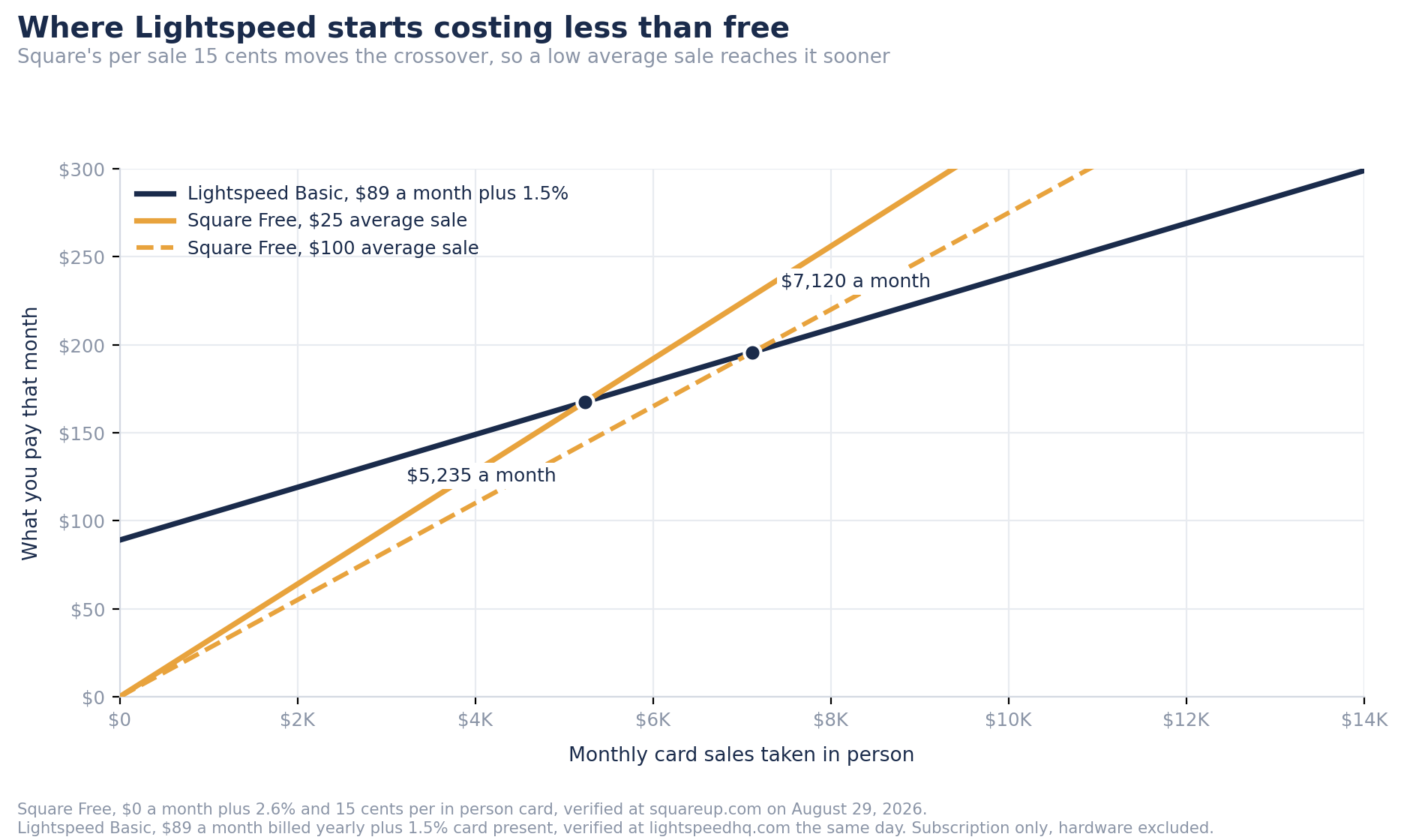
Choose Lightspeed if you run an established shop with thousands of SKUs across more than one location. Card volume is the other reason. Once 1.5% beats 2.6% by more than the subscription, Lightspeed pays for itself. Where that happens depends on your average sale, because Square charges 15 cents on every card as well as its percentage. At a $25 average sale the crossover arrives at about $5,235 a month in card sales. At a $100 average sale it moves out to about $7,120. Small tickets get there sooner.
Frequently Asked Questions
Yes, by a wide margin. Square has a free plan with no monthly fee, no contract, and a setup you finish in minutes. Shopify POS needs a Basic plan at $39 a month. Square also scores higher on G2, 4.7 out of 5 against 4.4, and staff pick it up faster. Shopify wins later, once online selling becomes the main channel.
On subscription, Square. Its free plan is $0 a month while Lightspeed Basic is $89 a month billed yearly, a gap of $1,068 over a year. Card rates run the other way. Lightspeed Payments is 1.5% card present against Square's 2.6% plus 15 cents, so heavy card volume flips the answer. The crossover depends on your average sale, because Square also takes 15 cents per card. It sits near $5,235 a month at a $25 average sale and near $7,120 at a $100 average sale.
Yes, the plan is genuinely free. It includes payment processing, inventory tracking, a basic online store, invoicing and team scheduling, with no monthly fee and no user limit. You pay 2.6% plus 15 cents on each in person card. Hardware starts at $59. Tap to Pay on iPhone and Android costs nothing, so you can open with no hardware at all.
Yes, and all three say so. Square section 21 allows a reserve, delayed payouts or suspension if it believes you might incur excessive chargebacks. Shopify section C4 allows a hold on 100% of a transaction, and section D2 allows closure at any time for any reason. Lightspeed publishes no payments terms, so ask before signing.
Square is the easiest. You download the app, open an account, and take a payment within minutes. It scored 4.8 out of 5 on ease of use in our evaluation. Shopify is close behind, though the online store side needs more setup. Lightspeed has the steepest curve of the three, which is why it includes free one to one onboarding.
Yes, it is worth it. POS Lite comes with your existing plan, so selling in person adds no monthly cost. Inventory syncs on its own. POS Pro costs $89 a month for each location and adds staff permissions, inventory counts and retail reporting. Most single location shops start on Lite and upgrade when staffing grows.
Was this article helpful?
The information on this page is for educational and informational purposes only and should not be considered professional advice. Product features, pricing, and availability may vary. Always compare multiple options and verify details directly with the provider before making a decision.
Sources & References
- Square processing fees, official rate card
- Square plans and pricing
- Square Payment Terms, reserves and excessive chargebacks
- Shopify POS pricing
- Shopify Payments Terms of Service
- Lightspeed Retail pricing
- Lightspeed Service Agreement
- Visa Acquirer Monitoring Program fact sheet
- Mastercard on scam merchant monitoring and the 72 hour rule
- Square Point of Sale reviews on G2
Questions about Best POS System for Small Business in 2026 - Top Picks Reviewed and Ranked
No comments yet. Ask the first question and a member of our team will answer.
Leave a comment